
Centos7.5源码安装postgresql-12
源码安装
首先安装readline 和readline-devel
1
2
yum install readline
yum install readline-devel虽然已经安装了readline,但是不安装readlene-devel 在执行
./configure --prefix=/opt/postgresql的时候会提示,configure: error: readline library not found。接下来在执行
1
2
./configure --prefix=/opt/postgresql
make && make install将postgresql 加入环境变量,打开文件 /etc/profile 在末尾添加
1
2
3
export PG_HOME=/opt/postgresql #为安装postgresql的地址
export PATH=$PG_HOME/bin:$PATH
source /etc/profile #更新环境变量创建postgresql 的用户以及用户组 可创建可不创建
1
2
3
groupadd postgresql #创建用户组
useradd -G postgresql postgresql #创建用户
passwd ******** #设置密码初始数据库
1
2
3
4
su postgresql -c 'pg_ctl -D /opt/postgresdata initdb' #初始化数据库
su postgresql :使用这个用户进行操作
/opt/postgresdata:地址为存放初始化的文件路径可自定义, 这个文件的用户权限要为 postgresql可操作
pg_ctl :postgresql 的控制器,可以对postgresql 进行启动停止等操作执行以上语句后会再 /opt/postgresdata 路径下生成一些文件
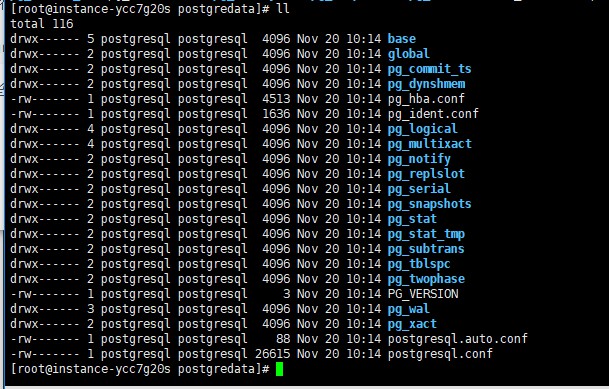
| 文件 | 描述 |
|---|---|
| postmaster.pid | 首行记录了进程PID |
| serverlog | 数据库日志 |
| postgresql.conf | 主配置文件(可做定制 |
| pg_hba.conf | 鉴权相关文件 |
| PG_VERSION | 当前主版本号 |
启动数据库
1
su postgresql -c 'pg_ctl start -D /opt/postgredata -l serverlog'
设置远程访问,在 pg_hba.conf文文件末尾加上:
1
host all all 0.0.0.0/0 md5
为了让 postgresql用户可以远程访问,可以通过 psql 设置密码:
1
alter user postgresql with password '*********';
开启远程访问,默认情况下 postgresql 仅仅监听本机的端口,需要编辑 /opt/postgredata/ postgresql.conf 文件开启远程IP的访问
1
listen_addresses = '*'
常用命令
1
2
3
4
5
6如果需要定制端口,可以执行脚本:
postgres -p 5430 -D /opt/postgredata >serverlog 2>&1 &
检查进程是否存活:
netstat -nlp |grep `head -1 /opt/postgredata/postmaster.pid`
停止数据库进程
kill -INT `head -1 /opt/postgredata/postmaster.pid`配置自启动
找到源码目录中 contrib/start-scripts/linux\脚本文件,拷贝为 /etc/init.d/postgressql。修改内容如下:
1
2
3
4
5
6
7
8
9
10
11程序所在目录
prefix=/opt/postgresql
数据目录
PGDATA="/opt/postgredata"
运行用户
PGUSER=postgresql
日志文件
PGLOG="$PGDATA/serverlog"设置执行权限
1
chmod +x /etc/init.d/postgressql
此后,执行以下命令可以方便的启停服务
1
2
3
4
5
6
7
8
//手动启动服务
service postgressql start
//查看服务状态
service postgressql status
//手动停止服务
service postgressql stop设置开机启动 ,执行以下命令:
1
chkconfig --add postgressql
yum安装
安装完成会自动创建一个用户为:postgres
首先使用管理员用户修改密码,然后登录以后,运行psql 即可使用,
允许远程访问,yum安装的ppostgresql 的配置文件在/var/lib/pgsql/12/data 目录下
修改配置文件 postgresql.conf 将 listen_addresses = 'localhost' 改为 listen_addresses = '*'
然后在修改 pg_hba_conf 在最后一行添加 host all all 0.0.0.0/0 md5 允许所有IIP访问, 如果限定IP,将0.0.0.0 改为指定IP。
重启命令postgresql :systemctl restart postgresql-12
 微信
微信 支付宝
支付宝